To open multiple Chrome tabs at desired websites, follow either of these options:
OPTION 1: (Open All)
1. Open up Chrome, right click on the bookmark bar.
2. Select "add folder..."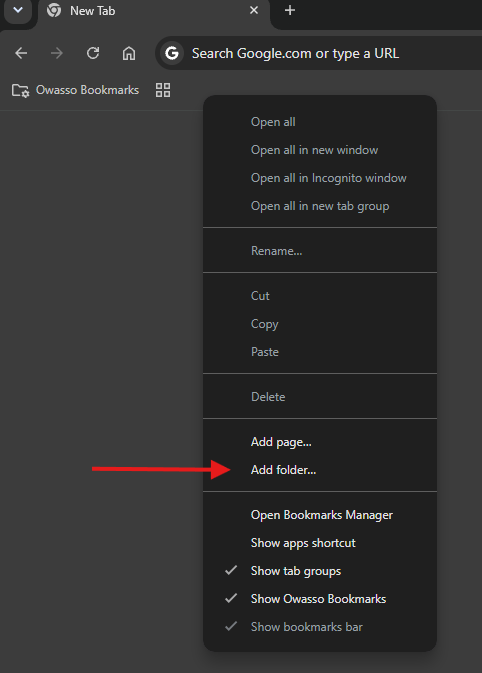
3. Name the Folder and Save.
4. Go to the desired webpages and bookmark them under this new folder
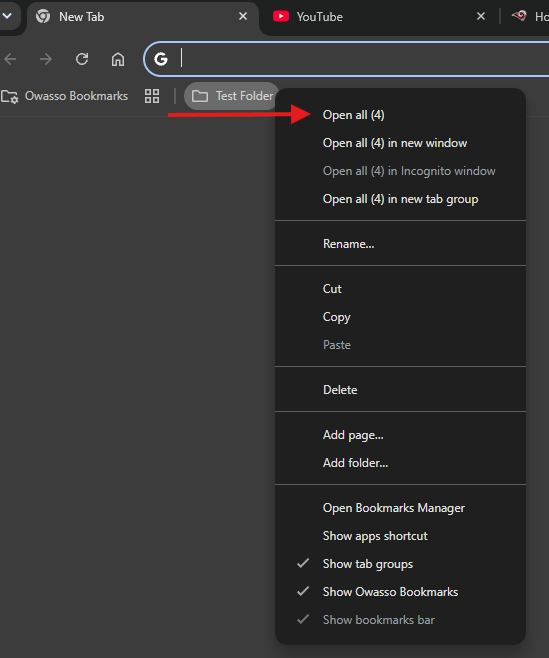
5. Once all webpages have been added to the folder, you can right click the folder at any time and click "Open All". This will open all saved bookmarks within the folder.
OPTION 2: (Group Tabs)
1. Open the websites you use daily.
2. Right-click any tab and select Add tab to new group.
3. Give the group a name (e.g. Startup Apps), pick a color, and make sure the Save group is toggled on.
4. Drag your other daily tabs into this group. The saved group will sit on your bookmarks bar for quick one-click opening and closing.